On this page
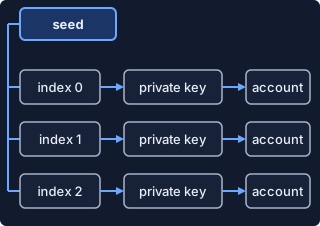
Three strings get mixed up around a Nano wallet: the seed, the private key and the public key. Only two of them can ever cost you money. Nothing on this page needs you to type a seed anywhere, and you should never paste one into a website, a chat or a form.
Do these today
Setting up your first wallet? Choose one, back up its recovery phrase and start with a small amount. The Nano wallets page lists the wallets nano.org links to. Before real money goes in, these four are not optional:
- Write the phrase on paper, by hand. Spell each word exactly as shown. Paper or a hardware wallet beats a phone or computer by a wide margin.
- Never photograph it or save a copy online. Uploading it to the cloud may be all a hacker needs.
- Read it back. Verify that you wrote it down correctly and can read it back without error.
- Tell nobody. Support staff included: no genuine support desk needs it (see Nano scams and how to avoid them).
Everything below is detail. Skip to the section you need.
Seed vs private key in one minute
Your Nano address belongs to an account you control the private keys of. The private key is the part that matters for control, because if you know or can know it, you can transact as if you own that account. Only the holder of the private key may sign and publish blocks to their own account chain.
The seed sits one level above. A seed is 32 random bytes, usually shown as a 64 character, uppercase hexadecimal string. By definition a seed is a 256-bit random value, and private keys are derived from a seed. In general wallet terms, a private key controls one account while the seed behind it can reach many.
| Item | What it is | What it can do |
|---|---|---|
| Seed | 256-bit random value, shown as 64 hex characters | Gives access to all private keys derived from it |
| Private key | A 256-bit value | Controls one account and signs its blocks |
| Public key | Derived from the private key with ED25519 | Identifies the account; the address represents it |
One seed, many accounts
Private keys are derived from the seed and a number called the index. Wallets commonly start at index 0 and add 1 each time you create a new account, so recovering your accounts is as easy as importing the seed and creating accounts again. The same idea appears in the node: a wallet is an object holding a single seed from which multiple accounts are derived through an index starting at 0.
The reverse direction does not work. Nobody can get from an address back to a private key, and the address is only a representation of the public key. How an address is built covers the checksum and prefix. The index maths, mnemonic standards and the reasons two wallets can disagree sit in key derivation, for developers.
Mnemonic seed (recovery phrase)
A mnemonic seed is a list of ordinary words that stands in for the long seed. Wallets call it a recovery phrase, secret recovery phrase or seed phrase, and they are the same thing. Treat it as the key to the whole wallet, because it is the backup of all the private keys the wallet holds.
What the words are. The phrase does not start out as words. It is a translated version of a long number called the entropy, which is too long to write down by hand. The BIP-39 standard turns that number into words from a fixed list of 2048 English words. Nano wallets that offer words should use the BIP39 word list.
How many words. Expect 12, 18 or 24. Ledger devices always use 24 words, which translates into 256 bits of entropy. Cake Wallet lets you pick a 12 word phrase (the default) or a 24 word one when you choose the BIP39 seed type. More words means more entropy, and the phrase is only safe if that entropy was generated at random.
Why order matters. Type the words back in the order shown or you get a different wallet. Words entered in the correct order recover all of your accounts, while an error in spelling or word order produces a different set of addresses. Number the words as you write them.
Words or hex? A Nano wallet may still hand you the older 64 character hex seed instead of words. Cake Wallet offers both: a BIP39 type, and a Nano type kept for compatibility with other Nano wallets. A 24 word phrase can also be derived from a Nano hex seed, and that phrase is not a BIP44 seed. Write down which kind you hold next to it. The derivation page covers why two apps can turn the same words into different accounts.
Hardware, software and paper: where the keys live
Every wallet type answers one question differently: where does the key sit when you are not using it? How you store the seed depends on how much convenience you want. Our order: a software wallet with a paper backup for a small balance, a hardware wallet once the balance is worth the setup, and an exchange last, because it holds the seed for you.
| Where the key lives | What protects it | What can go wrong |
|---|---|---|
| Software wallet (phone, browser) | A password; Nault encrypts the seed with the password you choose | A hacked wallet tricks you into typing your seed; spyware can find files holding a phrase |
| Hardware wallet | Keys encrypted inside the device behind a 4-8 digit PIN; the wrong PIN erases it | The recovery sheet is still a single point of failure |
| Paper backup | Being offline and hidden | Anyone who finds it has the keys, unencrypted |
Software wallets. Nault never sends keys to a remote server and keeps them in the browser’s local storage. The strength of the password sets the level of security. A password manager is an option, but keep a non-digital backup in case the electronics fail. Nano Hub lists non-custodial wallets whose keys stay on your device, and it notes that the Nano Foundation is not responsible for outside sites and services.
Hardware wallets. Nano Hub lists a hardware wallet that works with several community-built wallets. The device generates the phrase offline, so spyware cannot see the words. You confirm the destination and balance on the device’s own screen, so a hacked wallet cannot trick you. That screen is isolated from the internet and cannot be tampered with by hackers. Even so, a hardware wallet does not make you invincible against social engineering, physical threats or human error. Never import a hardware wallet’s phrase into a software wallet, which could expose it to online threats.
Paper. Paper is the least forgiving format: ink wears off, water can make it illegible and fire can destroy it. Paper is the right first backup: it is safe as long as only you can reach it, because the safety rests on where you hid it. Nano Hub also lists paper wallets, but those are for giving nano away as gifts.
Exchanges are not on this list. Storing nano at an exchange does not technically mean you own it, because the exchange handles the seed for you. Exchanges can be hacked or closed down without warning.
Editor's takeStart with a non-custodial wallet and a small amount and write the phrase on paper. Move to a hardware wallet once the balance is worth the extra setup: a hardware wallet with the backup in a bank vault is much more secure, and not having immediate access adds resilience to physical threats.
More care as the balance grows
The four steps at the top cover a first wallet. These matter once you hold more.
- Set up in private. Generate the phrase yourself and never use a preconfigured device. If a new device arrives with a phrase or PIN already filled in, do not use it, because it may be pre-owned or tampered with.
- Hide it where only you can reach it. A place that only you know and can reach is best, and a living room table is not that place. Nobody else should know the hiding spot: not family, not housemates.
- Protect it from damage. Fire, water and pipes are the usual threats to paper. Steel backups resist fire, water damage and other physical threats.
- Do not split it yet. A phrase split into parts kept in different places means no single part can rebuild it, but this only helps if you do it correctly. A beginner who splits a phrase badly can lock themselves out.
- Keep the value to yourself. Do not advertise what you hold. A verified backup in a safe place does not protect you from burglary or coercion. Keep a second wallet with a smaller amount for frequent use and the larger amount in the safe. Avoid transacting with a software wallet on shared wifi.
- Running a node? Mind the wallet ID. Everyone else can skip this. A node wallet has an ID of 32 random bytes that looks like a seed but is only a local name in the node’s database file. It restores nothing, so back up the seed.
If a phrase may be exposed
Assume the worst the moment you suspect it. Anyone with your phrase has immediate access to your crypto assets, and taking that access back is hard, because the same words always give the same keys.
- Move first, investigate later. If the backup is destroyed or compromised, move your crypto to a newly set up wallet immediately. Create the new wallet from a fresh phrase that you generate yourself.
- Do not just change the seed in the old wallet. On a node, switching the seed of a wallet that already has accounts can cause accidental loss of funds. The practical route for a beginner is a brand new wallet, not a repaired old one.
- Anything typed into a phishing page counts as exposed. Whoever receives the phrase controls the wallet and can move the funds for good.
- Work out how it leaked. A phrase that sat in a photo, an email or a cloud folder leaked there. Delete the copies, then fix the habit before you generate the next phrase.
- Report scams. If you lose money to a scam, report it to your local police.
Restoring on a new device
Restoring works because the crypto is not inside the wallet; it is on the blockchain, and the wallet only holds the keys connecting you to your addresses. That is why a lost or broken phone does not lose your nano if the phrase survives.
Work down this list in order.
- Pick the wallet. Wallets that nano.org links to are listed on the Nano wallets page, and Nano Hub carries the same kind of listing. Install from the wallet maker's own page.
- Use the app that made the backup. Restore in the same app that created it unless you know both use the same format, because the same words can open different accounts in different wallets.
- Choose "restore", not "create". A new wallet usually offers a new wallet or a restore from a recovery phrase. Pick the restore option and fill in your words.
- Match the seed type. In Cake Wallet the Seedtype option under Advanced Settings chooses between BIP39 and Nano. If you restored in the wrong type, you will see the wrong accounts.
- Check the first address. Wallets commonly start at index 0 and add 1 for each new account, so your first account should reappear first. If the address does not match what you recorded, stop and try the other seed type before you add anything.
- Send a small test. When you use a software wallet, send a small amount first to confirm it arrived.
For a wallet you run on your own node, the guidance is to always create a new wallet when restoring a seed.
Scams that go after the phrase
- Fake security updates. A phishing page may ask for your seed phrase to activate a “security update”. No legitimate support representative, exchange, wallet maker or authority will ever ask you for it.
- A convincing story. Phone scammers spoof the caller ID so the call looks like it comes from the wallet maker’s support desk. If someone pressures you by phone or email, stop engaging immediately.
- Links. Type your wallet or exchange address into the browser yourself instead of following a link.
Where to go next
Browse the wallets hub for more guides as they are published, or continue with how a Nano address is built, how Nano works and how to send Nano. If you run a node or write wallet software, read key derivation next. The primary texts are the key management guide, the integration basics and the glossary.
Common questions
Are a seed phrase and a private key the same thing?
No. A private key controls one account and lets you sign its transactions. A seed is the value that private keys are derived from, so it reaches every account beneath it. The seed cannot sign a transaction directly.
What is the 12-word secret phrase?
It is a mnemonic seed: a series of words, commonly 12, 18 or 24, used to back up a wallet. Wallets that offer mnemonic seeds should use the BIP39 word list. Some Nano wallets still use the 64 character hex seed instead, so check which one you hold.
Which crypto wallet has the best private key protection?
No source here ranks wallets, and protection depends on where the keys live. A hardware wallet keeps keys encrypted inside the device behind a PIN. A paper backup stays offline but is unencrypted if someone finds it. A hot wallet on a phone or computer is exposed to spyware.
Read next
Sending and receiving
How to send Nano (XNO), step by step
How a Nano send works: check the address and its checksum, set the amount in nano or raw, publish a send block, then confirm it. Includes fixes when it stalls.
Wallets and keys
Nano wallets list: 13 apps and how to pick
The 13 Nano wallets on Nano Hub, the directory nano.org links to: platforms, features, hardware and paper options, and how to pick one without a ranking.
Wallets and keys
Nano scams: fake wallets, support and giveaways
How to avoid Nano (XNO) scams: fake wallet apps, fake support and recovery offers, giveaways and impersonators. What each looks like and what to do.
Sources
- Integration Guides: Key Management · Nano documentation (docs.nano.org) · docs.nano.org · checked October 21, 2026
- Glossary · Nano documentation (docs.nano.org) · docs.nano.org · checked October 21, 2026
- Integration Guides: The Basics · Nano documentation (docs.nano.org) · docs.nano.org · checked October 21, 2026
- Nano in Cake Wallet · Cake Wallet documentation · docs.cakewallet.com · checked October 21, 2026
- Nano: zero fees, zero borders, zero limits · Nano (nano.org) · nano.org · checked October 21, 2026
- Private Keys Vs Seed Phrase: What's the difference? · Ledger Academy · ledger.com · checked October 21, 2026
- What Is a Seed Phrase? How to Protect It & Why It Matters · Ledger Academy · ledger.com · checked October 21, 2026
- How to Keep Your Seed Phrase Secure · Ledger Academy · ledger.com · checked October 21, 2026
- Security Tips for Hardware Wallets · Ledger Academy · ledger.com · checked October 21, 2026
- The security of your Nano · Nault documentation · docs.nault.cc · checked October 21, 2026
- Week 33: Crypto wallet phishing by post · Swiss National Cyber Security Centre (NCSC) · bacs.admin.ch · checked October 21, 2026
- Nano Hub: Wallets · Nano Hub (Nano Foundation) · hub.nano.org · checked October 21, 2026
Image credits (1)
- Nanos editors · Original diagram · source
Published . Limits and defaults can change with node releases: each source shows the day it was checked. How we check facts · Report an error.