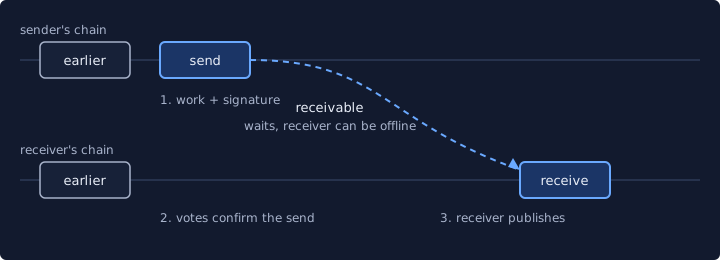
A Nano send is one block on your own chain. Everything else is checking. If you only do one thing before your first real payment, send a small amount first, which is Nano’s own advice too.
Send from a wallet
Every wallet words these screens differently, but the steps never change. No wallet yet? Pick one from the Nano wallets list and back up the recovery phrase before anything else.
- Get the address from the recipient themselves. It starts with nano_, then 52 characters that encode the account public key, then 8 characters of checksum. A payment link or QR code can carry the address and the amount for you.
- Read the address twice. Nothing can be undone afterward, and validating the checksum is recommended. If a stranger or a chat message handed you the address, stop and read Nano scams first.
- Type the amount in nano, the human-readable unit that wallets show.
- Confirm. The wallet builds the send block, signs it, adds a small proof of work that takes a few seconds on a desktop CPU, and broadcasts it. The network adds no fee.
- Wait a moment. The funds stay receivable until the recipient's wallet creates a receive block, even if they are offline.
Building a payment flow in code instead? That is a different job, and the RPC page covers it.
Why it takes two blocks
A transfer takes two separate actions. The sender publishes a block debiting their own account, and the receiver later publishes a matching block crediting theirs. The sender writes the check and the receiver cashes it later.
For the sender that has three consequences. The receiving account does not have to be online during the send. The funds stay receivable until a receive block is created. And once funds are sent, the sender cannot revoke them. A send confirmed by the network enters a receivable state and cannot be reversed.
Why can nobody tamper with this? Only an account owner can change the balance and representative on their own chain, and everyone agrees on that rule through signature checking. The block lattice page goes deeper.
Receiving is the same transfer seen from the other side. Share your address, and your wallet publishes the receive block when it picks the funds up. A node wallet that is synced and unlocked creates and signs receive blocks for all accounts in the wallet by itself.
Addresses and amounts
One user may control many accounts, and each account has exactly one public address. The address is base32, a scheme that limits ambiguity between look-alike characters, so there is no O next to a 0. The last 8 characters are a checksum of the public key, there to catch typos.
You may meet addresses that begin with xrb_. As of V19.0 the node only returns nano_ addresses, though earlier versions returned xrb_. The two prefixes are interchangeable and everything after the underscore stays the same, so the account you mean does not change. If the destination has never been used, your send gives it its first funds. That first receive is what people call opening the account.
Wallets show nano, the most common unit. The smallest is the raw, with 1 nano = 10^30 raw. You will only meet raw when software is involved, because all RPC commands expect amounts in raw. Nano units and raw has the conversion. Payment links follow the nano: scheme with an optional amount, label and message, and deep links use nano://. The amount in a link is always in raw, and a QR code uses the same raw amount.
Under the hood, every block stores the full account state, so the amount is the difference in balance between consecutive blocks. A falling balance marks a send, and the block’s link field holds the destination’s public key. That small proof of work is also why a second send can feel slower than the first. A node wallet precomputes work for one transaction in the background, so a send after a long pause is instant and the next one may wait for work.
How long confirmation takes
Representatives vote on each transaction, and every node cements it after enough votes to reach quorum. A message takes 20 to 100 ms to reach representatives, depending on location. When traffic is low, confirmation typically lands within a few seconds; how Nano works explains why published speed figures differ.
Editor's takeWait for confirmation before you tell the other person it is done.
A receiver must wait for confirmation of a receivable block before creating the receive.
When the transfer does not show up
Give it a few seconds, since it may take that long for a transaction to appear on the network. If one is slow to confirm, calling process again with the same block data carries no risk.
The nastier case is a block that never reached the network. Every later block on that account chain is then rejected, because its previous field points to a block nobody knows. Rebroadcasting the missing block makes the later blocks valid. The republish call that does it is on the RPC page.
A fork is a different thing. Only account owners can sign blocks into their own chains, so a fork comes from poor programming or malicious intent by the owner. Forks in Nano are never accidental, so nodes can set policy on how to treat forked blocks. When two contradictory blocks appear, nodes vote on both, and the first to reach 67% of voting weight is confirmed while the other becomes invalid. If you want protection, wait longer before receiving from an account that produced forks.
The one mistake you cannot fix is a wrong address, because a confirmed send cannot be reversed. Lose a generated private key and the funds in the account become inaccessible, so back it up.
New to all this? Start at what is Nano, or browse the Sending hub. The primary texts are the integration basics, the key management guide and the block confirmation tracking guide.
Common questions
How do I send crypto to someone?
On Nano, your wallet or node publishes a send block from your account to the recipient's nano_ address. The recipient later publishes a matching receive block, and they can be offline in between.
Read next
How Nano works
What is Nano (XNO)? Feeless protocol explained
What Nano is, who made it, and why transfers carry no network fee: one blockchain per account, representative voting and a small proof of work per block.
How Nano works
Nano block lattice explained
How Nano's block lattice works: every account keeps its own chain, a transfer is a send block plus a receive block, and votes settle any fork.
Sources
- The Basics: block lattice design, accounts, keys, blocks · Nano documentation (docs.nano.org) · docs.nano.org · checked October 20, 2026
- Protocol Design: Ledger · Nano documentation (docs.nano.org) · docs.nano.org · checked October 20, 2026
- Protocol Design: ORV Consensus · Nano documentation (docs.nano.org) · docs.nano.org · checked October 20, 2026
- Nano (cryptocurrency) · Wikipedia · en.wikipedia.org · checked October 20, 2026
- nano-node README · nanocurrency on GitHub · github.com · checked October 20, 2026
- Protocol Design: Distribution and Units · Nano documentation (docs.nano.org) · docs.nano.org · checked October 20, 2026
- Nano: zero fees, zero borders, zero limits · Nano (nano.org) · nano.org · checked October 20, 2026
- What is Nano? Overview · Nano documentation (docs.nano.org) · docs.nano.org · checked October 20, 2026
- Integration Guides: Key Management · Nano documentation (docs.nano.org) · docs.nano.org · checked October 20, 2026
- Integration Guides: Block Confirmation Tracking · Nano documentation (docs.nano.org) · docs.nano.org · checked October 20, 2026
- Commands: RPC Protocol · Nano documentation (docs.nano.org) · docs.nano.org · checked October 20, 2026
- Protocol Design: Attack Vectors · Nano documentation (docs.nano.org) · docs.nano.org · checked October 20, 2026
Image credits (1)
- Nanos editors · Original diagram · source
Published , last updated . Limits and defaults can change with node releases: each source shows the day it was checked. How we check facts · Report an error.